Logo
Sign in
  1. Ni-kshay Knowledge Base
  2. FAQs
  3. Ni-kshay - Software FAQs

Articles in this section

  • What's New
  • What is the Patient Workflow in Ni-kshay?
  • How do I continue using 99DOTS and MERM Adherence Technologies within Ni-kshay?
  • How to add Contact Tracing Details for a Patient?
  • How to transfer a patient?
  • How to generate DBT nutrition benefit for TB HIV patient registered by ART login in Ni-kshay?
  • How to add Co morbidity Details (HIV, Diabetes, Tobacco and Alcohol) for a Patient?
  • Why are many of my validated patients in 99DOTS still showing under Unvalidated (99DOTS) list in Ni-kshay V 2.0?
  • How to identify the treatment status of a patient?
  • How to add PMDT information for a Drug Resistant Patient?
See more

How do You Register a Patient?

Avatar
Ni-kshay HelpDesk
  • August 24, 2024 01:39
  • Updated

Step 0: Login to Nikshay

Step 1: Click “New Enrollment” Tab

Step 2: Fill the Form (with basic information)

Step 3: Click “+ADD CASE AND PROCEED TO ADD TEST” button
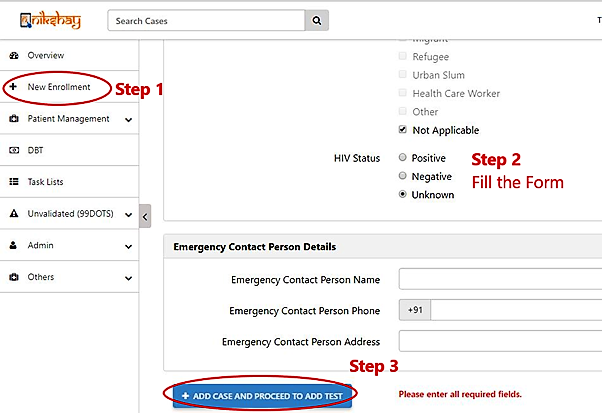
mceclip0.png

Was this article helpful?
4 out of 6 found this helpful
Return to top

Related articles

  • Enrollment Notification
  • What's New
  • What is the Patient Workflow in Ni-kshay?
  • How do you Update Treatment Details?
  • Introduction to Ni-kshay